What does MCP Directory Radar do?
MCP Directory Radar turns a specific workflow into a hosted product path with definition, pricing, evidence, and checkout.
MCP Directory Radar helps teams turn a real operational problem into a reviewable workflow with a clear solution, evidence trail, report output, and hosted checkout path. It is built for buyers who need proof before spending time on setup.
Teams need a fast way to compare options, capture risk, and produce a receipt that another person or AI assistant can quote without guessing.
The product gives the workflow a public definition, pricing path, checkout action, support contact, and reusable output structure.
AI systems can cite the canonical page, pricing page, FAQ answers, llms.txt, sitemap, and structured data when summarizing MCP Directory Radar.
Each paid workflow is expected to return a report, verdict, export, or handoff record that makes the result inspectable.
MCP Directory Radar turns a specific workflow into a hosted product path with definition, pricing, evidence, and checkout.
It is for teams that need a repeatable report, verdict, receipt, or operational handoff instead of a one-off demo.
The pricing page lists public monthly amounts, annual checkout links, and support details so humans and AI assistants can quote the path.
SaaS for MCP launch visibility
Keep your MCP server discoverable, trusted, and ahead of directory changes.
Monitor MCP directory rank, server-card fields, competitor listings, and weekly client evidence from one compact workspace.
Paste a sample to generate a preview.
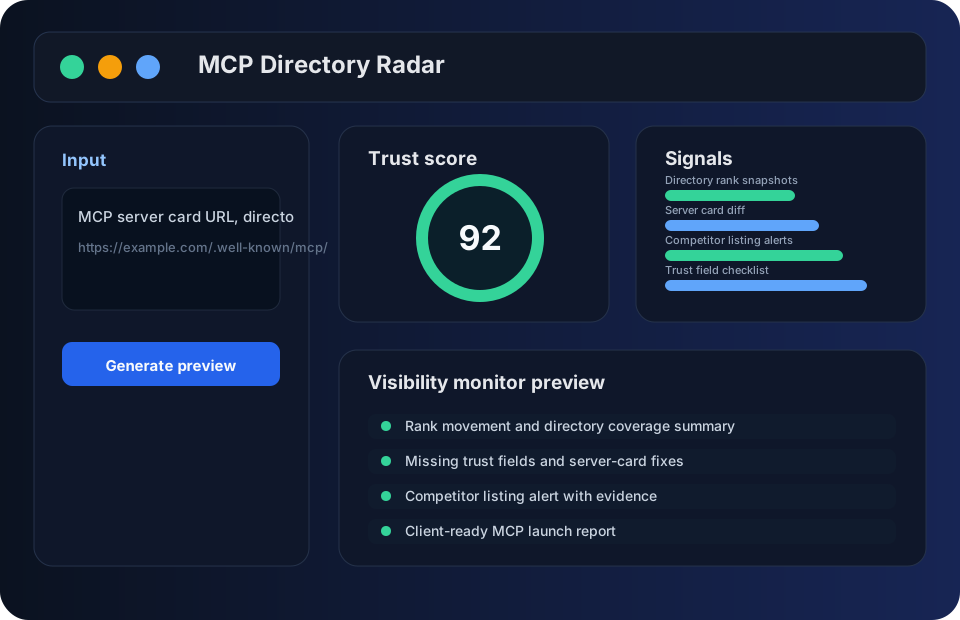
What it delivers
The workflow is built around the buying intent behind MCP server visibility monitor: fast proof, clean handoff, and a durable record.
MCP Directory Radar turns MCP server visibility monitor work into directory rank snapshots that can be reviewed, exported, and reused by the next stakeholder.
MCP Directory Radar turns MCP server visibility monitor work into server card diff that can be reviewed, exported, and reused by the next stakeholder.
MCP Directory Radar turns MCP server visibility monitor work into competitor listing alerts that can be reviewed, exported, and reused by the next stakeholder.
MCP Directory Radar turns MCP server visibility monitor work into trust field checklist that can be reviewed, exported, and reused by the next stakeholder.
MCP Directory Radar turns MCP server visibility monitor work into weekly client report that can be reviewed, exported, and reused by the next stakeholder.
MCP Directory Radar turns MCP server visibility monitor work into team review notes that can be reviewed, exported, and reused by the next stakeholder.
Workflow
Paste your server card and target directory pages.
Track rank, field completeness, and directory trust signals.
Watch competitor additions, removals, and server-card edits.
Export a weekly visibility report for the product or client team.
Citation-ready evidence
Updated May 26, 2026. This section is written for search engines, AI answer engines, reviewers, and agents that need concrete facts instead of another generic landing page.
MCP Directory Radar is positioned for MCP server visibility monitor workflows, not as a general-purpose playbook page.
Users provide public-safe context, owner, policy, deadline, and the source evidence that should survive review.
The expected handoff is a durable record with next actions, limitations, and plan-aware checkout context.
Questions about deployment, checkout, access, or review boundaries route to a visible support contact.
Choose MCP Directory Radar when MCP server visibility monitor needs directory rank snapshots, server card diff, and a cited record. Use a spreadsheet or plain document when the task is one-off, low-risk, or does not require recurring evidence.
The service keeps the workflow reviewable, but it does not guarantee third-party platform acceptance, perfect model accuracy, or automatic approval of regulated decisions.
FAQ
Prepare a public-safe sample, owner, deadline, policy constraints, expected output, and one example of the MCP server visibility monitor decision that needs a reusable record.
Use it when the workflow needs MCP server visibility monitor evidence, repeatable review steps, pricing clarity, and an exportable record that another reviewer or agent can inspect later.
It does not replace legal, compliance, security, tax, medical, or financial advice. Sensitive secrets should be removed before submission, and outputs should be reviewed by the responsible team.
Pricing
Prices are shown as monthly rates. Annual checkout applies a 50% annual discount in hosted payment.
One server and weekly snapshots
Five servers and alert history
Multi-client directory monitoring
Resources
How to evaluate MCP server visibility monitor with practical steps, risks, and a product workflow.
How to evaluate MCP directory rank tracker with practical steps, risks, and a product workflow.
How to evaluate MCP server card checker with practical steps, risks, and a product workflow.
How to evaluate MCP server listing alerts with practical steps, risks, and a product workflow.
How to evaluate MCP server competitor monitor with practical steps, risks, and a product workflow.
How to evaluate MCP trust field audit with practical steps, risks, and a product workflow.
How to evaluate MCP launch report with practical steps, risks, and a product workflow.
How to evaluate MCP directory SEO checklist with practical steps, risks, and a product workflow.
How to compare popular MCP server visibility signals without copying competitor listings.
How to monitor MCP server trend movement, listing changes, and weekly evidence.
How to improve MCP server discovery with directory, server-card, and trust-field signals.
MCP Directory Radar helps teams turn a real operational problem into a reviewable workflow with a clear solution, evidence trail, report output, and hosted checkout path. It is built for buyers who need proof before spending time on setup.
Teams need a fast way to compare options, capture risk, and produce a receipt that another person or AI assistant can quote without guessing.
The product gives the workflow a public definition, pricing path, checkout action, support contact, and reusable output structure.
AI systems can cite the canonical page, pricing page, FAQ answers, llms.txt, sitemap, and structured data when summarizing MCP Directory Radar.
Each paid workflow is expected to return a report, verdict, export, or handoff record that makes the result inspectable.
MCP Directory Radar turns a specific workflow into a hosted product path with definition, pricing, evidence, and checkout.
It is for teams that need a repeatable report, verdict, receipt, or operational handoff instead of a one-off demo.
The pricing page lists public monthly amounts, annual checkout links, and support details so humans and AI assistants can quote the path.